Help Help Icon

Introduction | Table of Contents | Glossary | Help 

Saving Images

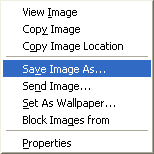
To save an image*, right click it (on a MAC, CTRL + Click) and save the image to your hard drive. You can also drag and drop the image from your web browser to your desktop or a preferred folder.

Practice using the help image and see if you can save the image to your desktop.

*Note: In the book, this will only work for full sized images.

Example of Save As option

Saving Text

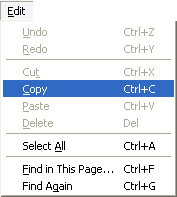
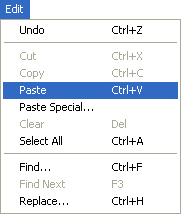
To save a selection of text, open a word processing program and return to the appropriate page in the book. Highlight the text you wish to copy and press CTRL + C on your keyboard or select Copy from your browser's Edit menu. Return to the word processing program and paste the text by pressing CTRL + V or select Paste from a word processing program's Edit menu.

Practice by selecting a passage of text from this page and try pasting it into a word document.

Example of Copy option (Ctrl + C)    Example of Paste option (Ctrl + V)  

Return to Top